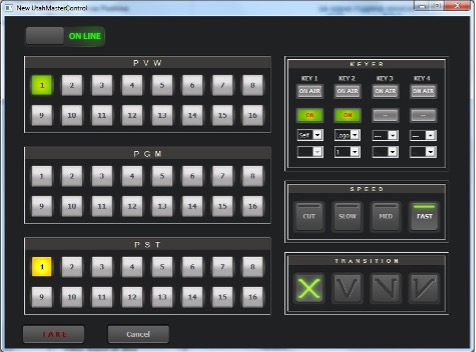
Utah Master Control Playout Event
The graphic user interface mimics a physical control panel. Click the Offline/Online button to toggle operation mode.
The switcher buses section of the dialog (to the left) represents the output buses of the switcher - preview and program bus, as well as the presets bus.
PVW – preview bus (16 selection buttons)
PGM – master program bus (16 selection buttons) PST – preset bus (16 selection buttons)
TIP: Ctrl + click a bus button to change its number/name. The new name will be applied to the corresponding buttons on the other buses as well.
The keyer control section of the dialog (top-right) contains 4 key inputs. Each key can operate in one of the following modes:
Self (the same input signal is used for key cut and key fill).
Ext (external key signal is used, e. g. from a character generator), and Logo. You can select from up to 15 logo presets in the drop-down menu below. The default key configurations matches the one of the physical device. To enable/disable a key, click the button below the ON AIR indicator to toggle between ON/OFF.
The transition controls section of the dialog contains 4 buttons for transition speed (top) and 4 buttons for transition type (bottom).The transition controls section of the dialog contains 4 buttons for transition speed (top row) and 4 buttons for transition type (bottom row).
The following transition types are available (from left to right) – Cross-fade, V-fade, Fade-Cut, Cut-Fade.
When you operate in Offline mode, click OK to apply the changes in the event setup. In on-line mode, Click TAKE to swap from preset to program instantaneously.