.png)
VTR Controller
Each VTR with RS-422 SONY protocol can be used in X-Pert Ingest. Use the VTR Controller interface at the bottom-right to send command to your VTR Device. Here is a short description of the VTR control panel:
The VTR brand is displayed in the window’s caption. If there is no connection, the text [Not Connected] will appear.
Display Indicators:
- TCR has three possible states – TCR (normally read timecode), T*R (corrected timecode), TCG (generated timecode, red).
- RecInh a record-protected tape is inserted in the VTR.
- Local indicates that the VTR is in local control mode and the remote control is not possible.
- Tape indicates that there is a tape in the VTR.
- EOT (End-Of-Tape) alarms that the tape is about to end or that the tape end has actually been reached.
- Indicator >> or << - shows the tape roll direction.
- Preroll indicator informs that the VTR is executing a preroll command.
- Servo indicator shows that playback is running stable.
- CueUp indicator – shows that the timecode positioning command has been successfully completed.
The Shuttle slider – allows shuttling within the particular VTR capabilities. If the VTR allows it, you could achieve variable speed by shifting this button left or right.
The Jog slider allows frame-accurate positioning.
IMPORTANT: The X-Pert modules DO NOT support the Deck Control connector supplied on the DeckLink breakout cable!
Config button – opens a configuration dialog box, where you can define:
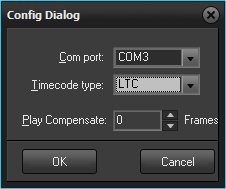
•Com port – COM port to which the recorder is connected
•Timecode type – select timecode type: LTC, VITC, CTL or Timer #
• Play Compensate – compensation (in frames) of the video recorder start towards the capturing start.
NOTE: Positive numbers indicate forwarding, negative numbers indicate play delay.