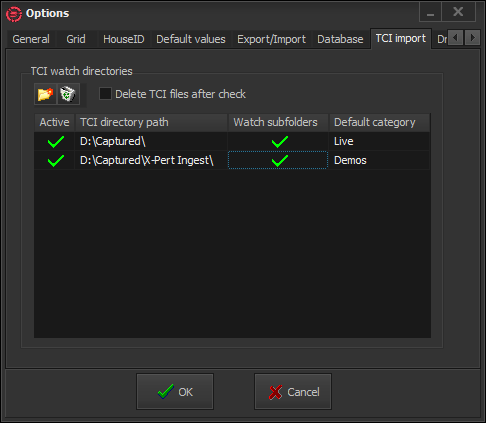
TCI Import
This feature provides options for automated media assets insertion. It uses the *.TCI files, generated by X-Pert Ingest during ingest. X-Pert Compact MAM watches a number of pre-defined folders. When a new *.tci file appears in a watch folder, a new record is automatically created in the database. If an already existing *.tci file has been modified in the watch folder, X-Pert Compact MAM checks if such a filename exists in the database (in the stream filename filed). If not – a new record is created. If yes – no new record will be created in the database.
The fields from *.tci files are imported in X-Pert Compact MAM as follows:
|
*.TCI field |
X-Pert Compact MAM field |
|
Name |
Title |
|
File |
|
|
Comments |
Notes |
|
TC In |
Media TC In string |
|
TC Out |
Media TC Out string |
|
Tape ID |
Media label |
NOTE: The remaining *.tci fields are not imported in X-Pert Compact MAM.
Use the Browse button  to browse for a watch folder. To enable/disable a watch folder, double click in the Active cell in the beginning of its row. Double-click in the watch folder’s path to change it. To the right of it, you can enable/disable watching subfolders.
In last column in the watch directories grid, you can assign a default category for each watch folder. Thus, every time a new clip appears in the relevant folder, the default category will be assigned automatically during its import in the database.
Example: This means that if you specify “Documentary” as Default Category, all clips, imported from TCI Directory ‘path D:\Captured\ will automatically become category “Documentary”.
NOTE: As Categories are subentries of database types, it is quite possible that the same categories appear in more than one type. In such a case, all new entries will be assigned as the highest TYPE in the database tree that contains the specified default category. For example, if both type CINEMA and type NEWS contain category Documentary, the new entries will be assigned as type CINEMA as it is higher than NEWS in the database tree.
To delete a watch folder, select it in the folders list and click on the Delete  button.
Delete TCI files after check can be used, if you want X-Pert Compact MAM to delete all *.tci files after each import operation.
IMPORTANT: Automated database insertion will not be carried out if there are no *.tci files!