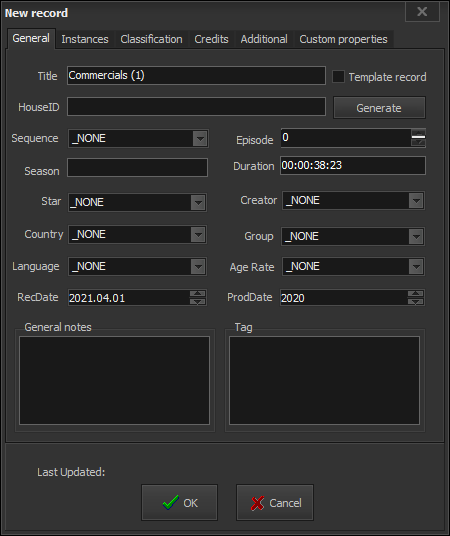
General
This is the main information form about the new entry.
The Title string contains the entry’s name. If the entry has been created by drag-n-dropping, this string will be automatically filled with the filename, without its extension.
The Template record – if you check it, the record will become a template record.
Template records are very useful for creating sequences that comprise of many records with the same data. When the record is a template, the following fields in this page are not editable: House ID, Episode No., Instances’ notes, and Instance’s location.
NOTE: If the template record is intended for a sequence and there are some series created in this sequence, you cannot edit the template record anymore!
The House ID is a unique identification of production house, including some extra data, such as production date and/or version, etc. The House ID can be entered manually or generated automatically, depending on your settings (Options menu  -> HouseID).
Generate button – you can press it if the HouseID Automatic generation option has been activated beforehand (Options menu ->HouseID -> Automatic generation). Use it, if you want to regenerate a House ID.
– Sequence – this string is designed for description of content that participates in certain types of sequences – music album, TV series, Mini Series, etc. You can define the sequence properties in advance from the Tree View.
– Episode – a unique number of the entry in the selected sequence. This field is not active when there is no sequence selected.
– Season – Many TV Series are usually made in batches, called Seasons.
For example, a typical TV series is made of up to 20 seasons, each containing up to 20 episodes. This field is not active when there is no sequence selected.
– Duration – displays the total duration of the entry. It is calculated automatically.
– Star – Usually this is the name of the main talent of the program. It corresponds to the “Star” category in New Record  -> Credits -> People.
– Creator – Usually this is the main producing company. It corresponds to the “Creator” category in New Record Credits -> Company.
– Country – As a rule it should contain the Country of Origin. It corresponds to “Country of origin” in Credits -> Countries/Locations.
– Language – Describes the original language of the entry.
– Group – Generally used to classify a program in a group, other than the standard classification scheme
– Type/Category/Genre. To choose a group, select it from the list. To add a new group, choose “Add new group…” from the list and enter a new group name.
– Age Rate – you can include some age restrictions for the item you are including, if applicable.
– RecDate stands for the date, when the entry was recorded in the database or received at the TV facility. By default, this field is filled-in with the current date.
– ProdDate usually stands for the program production date or year. By default, this field is set to current date.
– General notes – Used for storing useful notes about the program. It is a text field, limited to 255 symbols (including spaces and punctuation).
– Tag – gives the user the ability to add tags to the included item.